Fortnite Settings for PC Want to play Fortnite better in 2026? The right settings can give you a massive advantage. Here’s exactly what to change for maximum FPS and smoother gameplay.
Why Settings Matter
In a fast-paced game like Fortnite, every extra frame counts. A player running 144 FPS will react faster, aim smoother, and build quicker than someone stuck at 60 FPS. Even on a decent PC, the wrong settings can cut your performance in half.
Display Settings
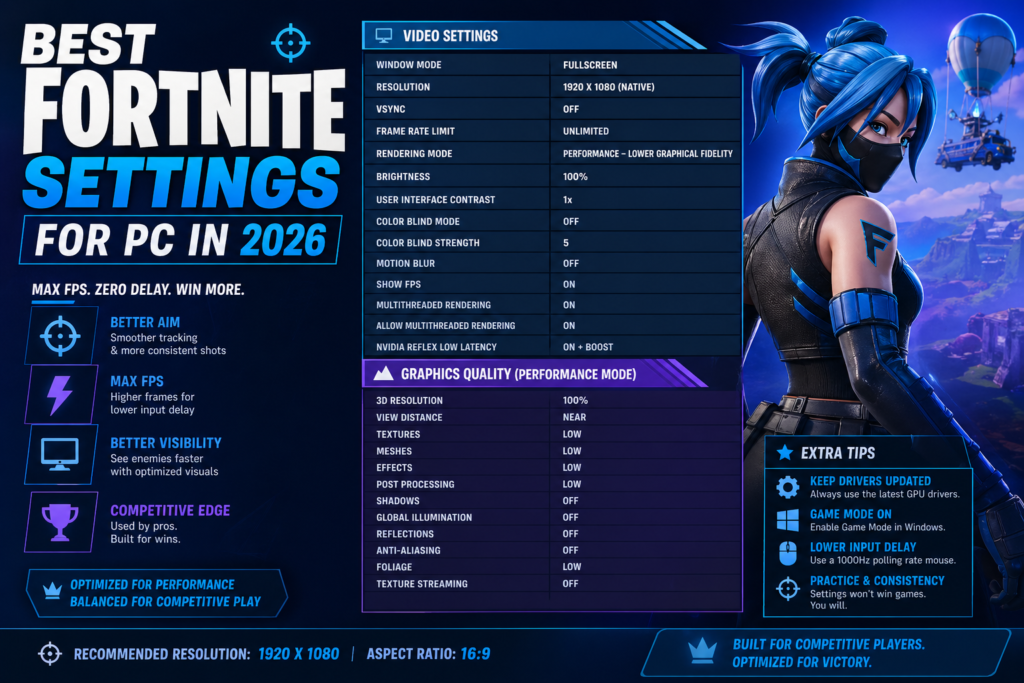
- Window Mode: Fullscreen – gives your PC full priority to the game
- Resolution: 1920×1080 – best balance of clarity and performance
- Frame Rate Limit: Set to your monitor’s refresh rate (144, 240, or 360)
- V-Sync: OFF – always keep this off to avoid input lag
Graphics Settings (for Max FPS)
- Rendering Mode: Performance Mode – this is the single biggest FPS boost
- Textures: Low
- Shadows: Off – turning shadows off alone can add 30-50 extra FPS
- Anti-Aliasing: Off
- Motion Blur: Off
- Ray Tracing: Off
- View Distance: Low or Medium (does not affect spotting enemies)
- Effects: Low
- NVIDIA Reflex Low Latency: On + Boost (if you have an NVIDIA GPU)
Mouse Settings
- DPI: 400-800 for most players
- In-Game Sensitivity: 7-12% – experiment to find your sweet spot
- Polling Rate: Set to your mouse’s maximum (1000Hz or higher)
Quick Tips
- Always close background apps like Discord video, Chrome, and streaming software before playing
- Keep your PC cool – thermal throttling can kill FPS even on powerful hardware
- Pro players almost always use Performance Mode with everything set to Low or Off
What FPS Should You Aim For?
For casual play, 60 FPS is fine. For competitive play, aim for 144 FPS minimum. The real sweet spot for ranked Fortnite is 240 FPS – this is what most pros target.
Apply these settings, drop into a match, and you’ll notice the difference immediately.